


The Complete Guide to Solar Security Cameras (2026)
, by matan shushan, 18 min reading time
, by matan shushan, 18 min reading time
This guide covers everything you need to know about solar security cameras: how they work, what features to compare, solar vs wired trade-offs, installation steps, winter performance, and the best cameras for homes and businesses in 2026. The key takeaway: modern solar powered security cameras deliver 24/7 surveillance without wires, outlets, or monthly fees, and they work reliably in nearly every climate.
More than 23 million home security cameras were sold in the United States in 2024, according to Parks Associates, and solar powered models are now the fastest-growing segment. The reason is simple: homeowners want reliable outdoor surveillance without running cables, hiring electricians, or paying monthly cloud fees.
A solar security camera solves all three problems. It runs on sunlight, connects over WiFi or cellular, and stores footage locally or in the cloud on your terms. Whether you’re protecting a front porch, a backyard, a warehouse, or a remote gate, solar cameras give you placement freedom that wired systems can’t match.
This guide walks you through everything you need to know before you buy. You’ll learn how solar cameras work, which features matter most in 2026, how they compare to wired systems, and which models fit different budgets and properties. If you already know what you want, browse our full Solar Security Camera collection to see every model side by side.
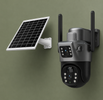
A solar security camera is a wireless surveillance camera powered by an attached or connected solar panel that converts sunlight into electricity, charging a built-in rechargeable battery so the camera operates 24/7 without any wired power source.
Beyond that core definition, there are a few things that set solar cameras apart from other wireless cameras. A standard battery camera needs you to remove it, charge it indoors, and remount it every few weeks or months. A solar security camera skips that cycle entirely. The solar panel feeds a continuous trickle charge to the internal battery, so the camera stays mounted and powered indefinitely.
Most modern solar cameras also include infrared or color night vision, motion detection, two-way audio, and smartphone app connectivity. They record to a local microSD card, to cloud storage, or both. The solar panel is either integrated into the camera body or mounted separately and connected by a short cable, giving you flexibility to angle the panel toward the sun while pointing the camera wherever you need coverage.
The technology has matured rapidly. Early solar cameras from 2018 and 2019 struggled with cloudy weather and short battery life. Models available in 2026 use higher-efficiency monocrystalline panels and lithium batteries that can run for days without direct sunlight.
Solar security cameras work by using a photovoltaic panel to convert sunlight into electrical energy, which charges an internal lithium battery. The battery powers the camera, sensors, and wireless transmitter around the clock, including at night when the panel is inactive.
Here is the process in more detail:
1. Solar panel absorbs light. The panel, typically 3W to 6W for residential cameras, generates DC power whenever exposed to daylight. Even overcast skies produce enough light to charge the battery, though at a slower rate.
2. Battery stores energy. The internal battery, usually between 6,000mAh and 15,000mAh, stores the power generated during the day. This reserve keeps the camera running through the night and through stretches of heavy cloud cover.
3. Camera operates continuously. The camera uses stored power to record video, run motion detection algorithms, illuminate infrared LEDs for night vision, and transmit data over WiFi or 4G LTE. Most cameras enter a low-power standby mode when no motion is detected, which dramatically extends battery life.
4. Smart power management. Modern solar cameras use intelligent power management chips that regulate charging speed, prevent overcharging, and prioritize essential functions if the battery runs low.
Night vision is one of the most common questions buyers have. For a deeper look at how infrared and color night vision modes work on solar cameras, read our guide on how solar camera night vision works.
Not all solar security cameras are created equal. The features below separate basic models from the ones that actually deliver reliable, long-term protection.
For a curated breakdown of top-performing models, see our best solar security cameras roundup.
Resolution determines how much detail you can capture. In 2026, the standard tiers are:
1080p (Full HD): Adequate for general monitoring. You can see people and movement clearly, but fine details like license plate numbers may be difficult to read at distance.
2K (2304x1296): The sweet spot for most homeowners. Sharp enough to identify faces at 30 feet or more.
4K (3840x2160): The top tier. Captures fine details even when zooming in digitally. Best for properties where identifying specific individuals or vehicles matters.
Higher resolution does require more storage and bandwidth. If your WiFi is limited, a 2K camera often provides the best balance.
There are two types of night vision found on solar cameras today:
Infrared (IR) Night Vision: Uses invisible IR LEDs to illuminate the scene. Produces black-and-white footage. Reliable and energy-efficient. Range typically 30 to 60 feet.
Color Night Vision: Uses built-in white LED spotlights or advanced sensor technology to capture color footage in low light. More useful for identifying clothing colors and vehicle details, but uses more battery.
The best outdoor solar security camera models offer both modes, letting you switch based on the situation.
Basic motion detection triggers on any pixel change, which means wind-blown trees and passing cars set off constant false alarms. Look for these upgraded detection methods:
PIR (Passive Infrared) Sensors: Detect body heat from humans and animals. Far fewer false triggers than pixel-based detection.
AI Human Detection: Uses onboard processing to distinguish people from animals, vehicles, and other movement. The most accurate option available.
Customizable Detection Zones: Let you draw specific areas on the camera’s field of view where motion should trigger alerts.
WiFi cameras connect to your home or business network. They are ideal when the camera is within range of your router (typically up to 300 feet with a clear line of sight). No ongoing cellular costs.
4G LTE cameras use a SIM card to transmit video over the cellular network. They are the right choice for remote locations without WiFi, like farms, construction sites, vacation cabins, and detached garages. Monthly data costs are minimal, since most cameras only upload short clips when motion is detected.
Any outdoor solar security camera needs a solid IP (Ingress Protection) rating:
IP65: Protected against water jets from any direction. Handles rain and sprinklers.
IP66: Protected against powerful water jets. Handles heavy storms.
IP67: Can survive temporary submersion. The highest rating you’ll find on consumer cameras.
Also check the operating temperature range. Quality solar cameras work from -4°F to 140°F (-20°C to 60°C), covering virtually every US climate zone.
Battery capacity and panel wattage together determine how well your camera handles bad weather stretches. Here are the benchmarks to look for:
Battery: 10,000mAh or higher for reliable multi-day backup.
Solar panel: 4W or higher for faster charging and better performance on cloudy days.
Standby time without sun: 4 to 7 days minimum on a full charge.
Monocrystalline panels are more efficient than polycrystalline. Most premium cameras in 2026 use monocrystalline.
Solar security cameras are wireless, self-powered, and easy to install anywhere with sunlight. Wired cameras require running cables for power and data but offer unlimited, uninterrupted recording without reliance on batteries or solar charging.
Here is how they compare across the factors that matter most:
|
Feature |
Solar Security Camera |
Wired Security Camera |
|
Power source |
Solar panel + battery |
Electrical outlet or PoE |
|
Installation |
DIY, 15-30 minutes |
Professional, 2-4 hours |
|
Placement flexibility |
Anywhere with sunlight |
Limited by cable reach |
|
Monthly fees |
None (local storage) |
Often required for cloud/NVR |
|
Weather dependence |
Needs some sunlight to charge |
No weather dependence |
|
Video recording |
Motion-activated clips |
Continuous 24/7 recording |
|
Upfront cost |
$50 - $200 per camera |
$150 - $400 per camera + install |
|
Best for |
Homes, renters, remote areas |
Large commercial properties, high-security |
Solar cameras have a clear advantage for most homeowners and small businesses. Wired systems still make sense for large commercial facilities that need continuous recording across dozens of cameras.
We break down every angle of this comparison in our detailed article on solar security cameras vs wired cameras.
Choosing the best solar security camera depends on your specific situation. Here are our top recommendations for the most common use cases.
Most homeowners need a single camera or two covering the front door, driveway, or backyard. The BugBuzz Solar Security Camera 2K WiFi is our top pick for homes. It delivers 2K resolution, AI human detection, color night vision, and two-way audio. It connects over WiFi and installs in under 20 minutes with no tools beyond a screwdriver.
Small businesses, warehouses, and retail shops need wider coverage and higher resolution for identifying individuals. The BugBuzz Solar Security Camera 2K WiFi handles most commercial needs with its wide field of view and smart detection zones.
Remote properties, construction sites, farms, and hunting land often have no WiFi access. The BugBuzz Solar Security Camera 4G LTE uses a SIM card for cellular connectivity, so it works anywhere with a cell signal. View live video and get instant motion alerts straight to your phone, no router needed.
If you need to cover multiple angles, entrances, or buildings, the BugBuzz Solar Security Camera System 4-Pack offers the best per-camera value. It includes four synchronized cameras with a unified app dashboard so you can monitor every zone from a single screen.
Browse all options in our Solar Security Camera collection to compare specs and pricing side by side.
One of the biggest advantages of a wireless security camera with solar power is the simple installation. No electrician, no cable fishing, no drywall patching. Here is the process in five steps:
Step 1: Choose your mounting location. Pick a spot that faces the area you want to monitor and receives at least 3 to 4 hours of direct sunlight per day. South-facing walls and eaves are ideal in the northern hemisphere.
Step 2: Mount the bracket. Use the included screws and anchors to attach the mounting bracket to your wall, soffit, or post. Most brackets require just two screws.
Step 3: Position the solar panel. If the panel is separate from the camera, mount it nearby and angle it toward the sun. Connect the panel to the camera using the included cable.
Step 4: Power on and connect. Turn on the camera and follow the app instructions to connect it to your WiFi network (or insert a SIM card for 4G models). The app will guide you through naming the camera, setting detection zones, and adjusting sensitivity.
Step 5: Test and adjust. Walk through the camera’s field of view to verify motion detection triggers correctly. Adjust the angle and sensitivity as needed.
For a more detailed walkthrough with photos and troubleshooting tips, read our full solar security camera installation guide.
Yes, solar security cameras work in winter. Modern solar panels generate electricity even on overcast winter days, and high-capacity batteries store enough energy to keep the camera running through long nights and multi-day stretches of heavy cloud cover.
This is one of the most common concerns buyers raise, and it’s understandable. Winter in northern states means shorter days, lower sun angles, and occasional snow cover on the panel. Here is how modern cameras handle it:
Shorter days, bigger batteries. A quality solar camera with a 10,000mAh or larger battery can run for 4 to 7 days without any solar charging. Even in December in Minnesota, most days produce enough daylight to partially recharge the battery.
Snow on the panel. A light dusting of snow typically slides off an angled panel. For heavier snow, a quick wipe with a gloved hand restores full charging. Mounting the panel at a 45-degree angle helps snow shed naturally.
Lower temperatures. Lithium batteries lose some capacity in extreme cold, but modern cameras are rated to operate at -4°F (-20°C) or lower. According to the U.S. Department of Energy, solar panels actually become slightly more efficient in cold temperatures, partially offsetting shorter daylight hours.
Motion-activated recording helps. Because solar cameras record only when motion is detected (rather than continuously), battery consumption stays low even during the shortest winter days.
We cover this topic in detail, including real-world winter performance data, in our article on whether solar security cameras work in winter.
Homes and businesses have different surveillance priorities. Choosing the right solar security camera starts with understanding what each environment demands.
Homeowners typically need one to four cameras covering entry points: the front door, back door, garage, and driveway. Key priorities include:
Ease of installation. DIY setup with no tools or wiring.
Smart alerts. Push notifications for human detection so you know when someone approaches.
Two-way audio. Talk to delivery drivers, visitors, or deter intruders through the camera’s speaker.
Privacy. Local storage on a microSD card with no mandatory cloud subscription.
The average US home needs two cameras to cover front and back. A WiFi-connected solar camera like the BugBuzz 2K WiFi model is the right fit for most households.
Small businesses, rental properties, and commercial lots need broader coverage and more robust features:
Higher resolution (2K or 4K). Capturing faces and license plates at distance is critical for loss prevention and incident documentation.
Multiple cameras. Covering entrances, parking lots, storage areas, and perimeters typically requires four or more cameras.
4G connectivity. For locations without reliable WiFi, such as construction sites or agricultural land, a 4G LTE solar camera keeps you connected.
Weatherproofing. Commercial cameras face harsher exposure, so IP66 or higher is recommended.
According to a 2023 University of North Carolina study, visible security cameras reduce the likelihood of burglary by up to 50%. Solar cameras are especially effective as deterrents because they can be mounted in highly visible locations without worrying about wire concealment.
For a deeper comparison of home and business camera setups, read our guide on solar security cameras for home.
“We installed two BugBuzz solar cameras at our lake house three months ago. The property is 40 minutes from the nearest town, so there’s no WiFi. We went with the 4G LTE model and it’s been rock solid. We get motion alerts on our phones within seconds, and the night vision is clear enough to identify faces. Best part: zero wiring and zero monthly fees. These cameras just work.” Jason R., Lake Ozark, MO (Verified Buyer)
BugBuzz designs every solar security camera specifically for the demands of outdoor, off-grid surveillance. Our team tests each model across seasons, climates, and real-world conditions before it reaches your door.
Every camera ships with a high-efficiency monocrystalline solar panel, a rechargeable lithium battery, and all the mounting hardware you need. Setup takes under 30 minutes with no professional help.
We provide free US shipping, a 30-day return window, and responsive customer support based in the United States. No cloud subscriptions are required. Your footage stays on your microSD card, under your control.
When you buy from BugBuzz, you’re getting purpose-built solar surveillance equipment backed by a team that actually uses these cameras to protect their own properties.
A solar powered security camera gives you 24/7 outdoor protection with no wires to run, no power bills to pay, and no subscriptions to manage. BugBuzz cameras install in minutes, ship free across the US, and come with everything you need in the box.
Browse All Solar Security Cameras →
A quality solar security camera lasts 3 to 5 years with normal outdoor use. The solar panel itself can last 20 years or more. Battery capacity gradually decreases over time, but most manufacturers rate their batteries for 500+ charge cycles before noticeable decline.
Not all of them. WiFi models need a wireless network to transmit video and alerts to your phone. However, 4G LTE solar cameras use cellular data instead, making them ideal for locations without WiFi like rural properties, farms, and construction sites.
Yes. Solar cameras charge during the day and store energy in their internal battery, which powers the camera and its night vision system through the night. Infrared LEDs or white LED spotlights provide illumination for clear footage in complete darkness.
Residential solar security cameras typically cost between $50 and $200 per unit. Multi-camera systems and 4G LTE models tend to be at the higher end of that range. Unlike wired systems, there are no professional installation costs and no mandatory monthly subscription fees.
Quality outdoor solar security cameras carry an IP65, IP66, or IP67 rating, meaning they are protected against rain, snow, dust, and extreme temperatures. Look for cameras rated to operate between -4°F and 140°F for all-season use.
BugBuzz solar cameras do not require monthly fees. They store footage on a local microSD card. Some brands offer optional cloud storage plans, but it is never mandatory with BugBuzz products.
Mount the camera 8 to 10 feet high, angled slightly downward, facing the area you want to monitor. Position the solar panel where it gets the most direct sunlight, ideally south-facing in the US. Avoid mounting under deep eaves or overhangs that block sunlight from reaching the panel.